
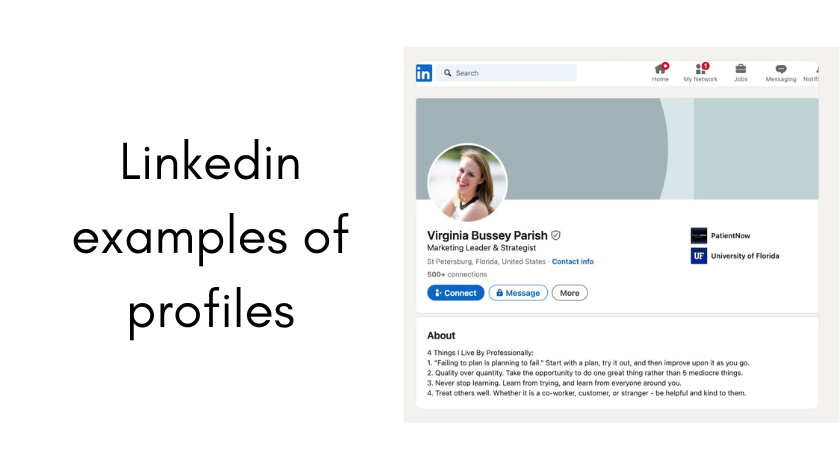
Let’s be honest. Looking for “LinkedIn examples of profiles” can feel incredibly overwhelming. You’ll find thousands of articles telling you to “be compelling” and “use keywords,” but what does that actually look like on the screen? It’s like being told to “paint a masterpiece” without ever seeing a brushstroke.
I’ve been there. I remember staring at my blank “About” section for what felt like hours, typing and deleting sentences that all sounded either boastful or boring. It wasn’t until I started looking at profiles not as templates to copy, but as case studies to learn from, that everything clicked. In my work, I’ve reviewed hundreds of profiles, from entry-level to CEO, and the best ones share a common DNA. Today, I want to walk you through that DNA, using tangible examples and explanations you can apply immediately. This isn’t about gaming the algorithm; it’s about clearly and authentically communicating your value to another human being, who is often a recruiter or a potential client, scrolling quickly on their phone.
Why Your LinkedIn Profile Isn’t Just a Digital Resume
First, we need to shift our mindset. Your resume is a formal document, often tailored for a specific job and parsed by machines. Your LinkedIn profile is your public, living professional persona. It’s where your resume facts meet your personality, your network, and your thought leadership. People visit it when you apply for a job, when they meet you at a conference, when they’re considering you for a freelance project, or when they’re just curious. Every section is an opportunity to connect, not just list.
The First Impression: Your Headline, Photo, and Banner
This is the top third of your profile. It’s all anyone sees before they decide to click “See more.” Let’s break it down with examples.
-
The Headline: The default here is your current job title and company. This is a missed opportunity. Your headline is prime real estate for keywords and value.
-
Weak Example: “Marketing Manager at ABC Corp.”
-
Better Example: “Marketing Manager | Driving Growth for B2B SaaS Brands Through Data-Driven Campaigns”
-
Why it Works: The better example tells you what I do (Marketing Manager), who I do it for (B2B SaaS brands), and how I do it (data-driven campaigns). It uses keywords a recruiter might search for (“B2B SaaS,” “growth,” “data-driven”). For a student, it could be “Aspiring Data Analyst | Skilled in Python & SQL | Turning Complex Data into Actionable Insights.”
-
-
Profile Photo: This seems simple, but the number of pixelated selfies, distant vacation shots, or overly formal studio portraits I see is astounding. Use a clear, friendly, head-and-shoulders shot with a neutral or professional background. Smile with your eyes. Dress for the role you want, not the one you have. Invest in a good photo; it’s the first signal that you take your professional presence seriously.
-
Background Banner: This blank blue space is a free billboard. A generic cityscape is fine, but a great one strengthens your brand.
-
For a Graphic Designer: A clean, attractive montage of their best work.
-
For a Project Manager: A simple, elegant graphic with a tagline like “Bringing Order to Complexity | PMP Certified.”
-
For a Student/Recent Grad: An image from a relevant university event, a conference, or a simple graphic with your degree and key skills. I used a simple Canva template with my name and the tagline “Writing to Simplify the Complex” for years, and it sparked more conversations than the default blue ever did.
-
The Heart of Your Story: The “About” Section (Summary)
This is where most people freeze. Do you write in first person (“I am…”) or third (“John is…”)? Do you tell a story or list skills? Based on countless examples, I strongly advocate for first person. It’s your profile; own it.
Let’s look at two effective but different approaches.
Example 1: The Narrative Approach (Great for Career Changers or Those with a Clear Journey)
“For over a decade, I worked in retail logistics, mastering the art of getting products from A to B efficiently. But I always found myself drawn to the data behind the decisions—why we shipped what, and when. That curiosity led me to night classes in data analytics. Today, I bridge those two worlds as a Logistics Analyst. I use Python and Tableau not just to track shipments, but to predict bottlenecks, reduce costs by 15%, and tell the story the numbers are hiding. I’m passionate about transforming old-school industries with new-school insights.”
-
Why it Works: It creates a compelling arc. It’s human, explains a non-linear path, and seamlessly integrates keywords (Logistics Analyst, Python, Tableau, reduce costs) into a story.
Example 2: The Direct, Value-Driven Approach (Great for Established Professionals)
“B2B content marketing leader with 8 years of experience building editorial strategies that generate leads and establish brand authority. I specialize in turning complex technical product details into clear, compelling content for SaaS companies. My core strengths include: ▶ Content Strategy & Team Leadership ▶ SEO-Driven Blog & Whitepaper Production ▶ Marketing Funnel Optimization Proven track record: Greve organic blog traffic by 300% and generated over 2,000 qualified leads in 18 months.”
-
Why it Works: It’s scannable, packed with keywords, and leads with value. Using bullet points (even with symbols) and bold results makes it easy to digest quickly. It answers “What can you do for me?” immediately.
Your “About” section should be a conversation starter. End it with a call to action: “Feel free to connect if you’re interested in discussing data storytelling,” or “Open to collaborating on innovative sustainability projects.”
The Proof Section: Your Experience
This is where you must move beyond your resume. Don’t just list duties; list achievements. Use the STAR method (Situation, Task, Action, Result) subtly in your bullet points.
-
Weak Duty: “Responsible for social media management.”
-
Strong Achievement: “Developed and executed a social media content strategy across Instagram and LinkedIn, growing engaged follower base by 40% (to 25k+) and directly contributing to a 15% increase in website referral traffic within one year.”
See the difference? The strong example shows impact. It uses numbers. Even if you can’t share specific metrics, use scale: “Managed a high-volume client portfolio,” “Streamlined the onboarding process, reducing training time for new hires.”
Learning from the Best: A Quick Niche Breakdown
-
For Students/New Grads: Your profile won’t be experience-heavy, so highlight projects, coursework, and skills. In your “Experience” section, list relevant university projects, club leadership, or volunteer work just like a job. Use the description to detail your role, the tools you used, and the outcome. Add a “Projects” section to showcase a key assignment or thesis.
-
For Creatives (Designers, Writers, etc.): The “Featured” section is your best friend. Link to your portfolio, publish articles on LinkedIn directly, and add images or documents of your work directly under the relevant job entry. Your profile itself should be an example of your eye for detail or clarity of communication.
-
For Leaders/Managers: Shift the focus from your individual contributions to team leadership, strategy, and business impact. Use bullet points like: “Led a cross-functional team of 8 to launch Product X, resulting in $2M in first-year revenue.” Highlight mentoring, budget management, and vision.
The Final Layer: Skills, Endorsements, and Recommendations
Curate your top 3 skills carefully—they appear right under your name. Choose a mix of hard and soft skills that are core to your brand. Endorsements are social proof; give them generously to get them thoughtfully. A few detailed, heartfelt recommendations are worth more than fifty one-line “Great to work with!” notes. Don’t be afraid to politely ask a former colleague or manager for one, and offer to write one in return.
Putting It All Together: Your Action Plan
-
Audit: Look at your profile now. Is it a list of duties or a showcase of achievements?
-
Research: Find 5-10 people in your desired role or industry. Don’t copy them, but note what you find compelling. What words do they use? How do they structure their story?
-
Rewrite One Section at a Time: Start with your Headline and “About” section. Then, tackle one job entry. It doesn’t have to be done in one sitting.
-
Get a Second Opinion: Ask a trusted friend or colleague to read it. Do they get a clear sense of who you are and what you do?
-
Engage: A perfect profile is a silent one. Post occasionally, comment on others’ posts thoughtfully, and share relevant articles. This activity puts your polished profile in front of people.
Conclusion
Finding the right LinkedIn profile examples isn’t about finding a mirror to duplicate. It’s about finding windows into what effective communication looks like in your field. The magic isn’t in a secret formula; it’s in the shift from treating your profile as an obligatory online CV to treating it as the central hub of your professional narrative. It’s a living document that should evolve as you do. Start today by just rewriting one thing—your headline. That simple act of intentionality will spark the rest. Remember, on the other side of that screen is a person looking for someone just like you to solve a problem. Your job is to make it unmistakably clear that you are that person.
Frequently Asked Questions (FAQ)
Q: Should I write my LinkedIn profile in the first person or third person?
A: I strongly recommend first person (“I,” “me,” “my”). It’s more personal, engaging, and conversational. Third person (“John is an expert…”) can come across as stiff or arrogant, unless you’re a high-level executive where it’s a stylistic norm.
Q: How long should my LinkedIn “About” section be?
A: Aim for 3-5 short paragraphs. You want to be comprehensive but scannable. Write enough to cover your key value points and story, but don’t write a novel. Most people will read the first few lines and scan the rest for keywords.
Q: Is it okay to connect with people I don’t know on LinkedIn?
A: Yes, that’s a core function of the platform! However, always include a personalized connection request. Mention why you want to connect—perhaps you admired an article they wrote, you work in a similar industry, or you’re interested in their career path. A blank request is often ignored.
Q: How often should I update my LinkedIn profile?
A: Treat it as a living document. Update it with any new significant achievement, project, or skill. Do a formal review every 6 months to ensure it still reflects your current goals and incorporates any new keywords from job descriptions you’re interested in.
Q: Can I see who viewed my profile?
A: With a basic (free) account, you can see a limited number of recent viewers. With a Premium subscription, you get more detailed insights. This can be useful to see if recruiters or hiring managers from target companies are visiting you.